01 / LISTEN
Hears every little thump
Use system audio or your mic. Every kick, vocal, and shimmer bends the scene live.
Feed it a beat and watch neon fractals, liquid geometry, and impossible color move with the music.
No timelines. No rendering. No serious face required. Pick a scene, hit play, and let your desktop leave the planet.
Use system audio or your mic. Every kick, vocal, and shimmer bends the scene live.
Jump between psychedelic shaders, recursive fractals, and fluid simulations that refuse to sit still.
Tweak speed, color, symmetry, and intensity. Keep it dreamy or turn it all the way up.
No mockup here. Pick a scene, tune the reaction, and let the music take over.
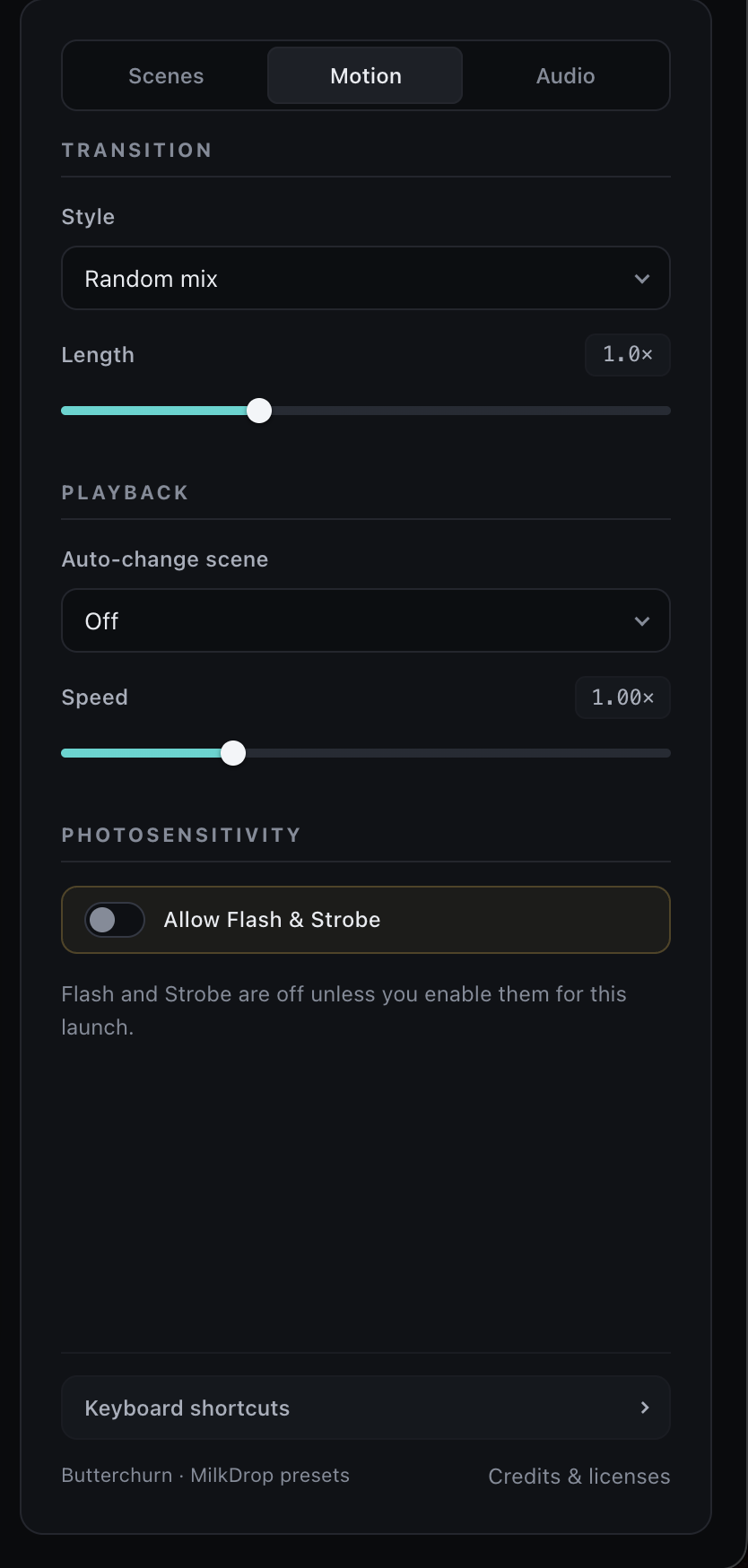
Pick a transition, set the pace, and choose whether Flash or Strobe can join in.
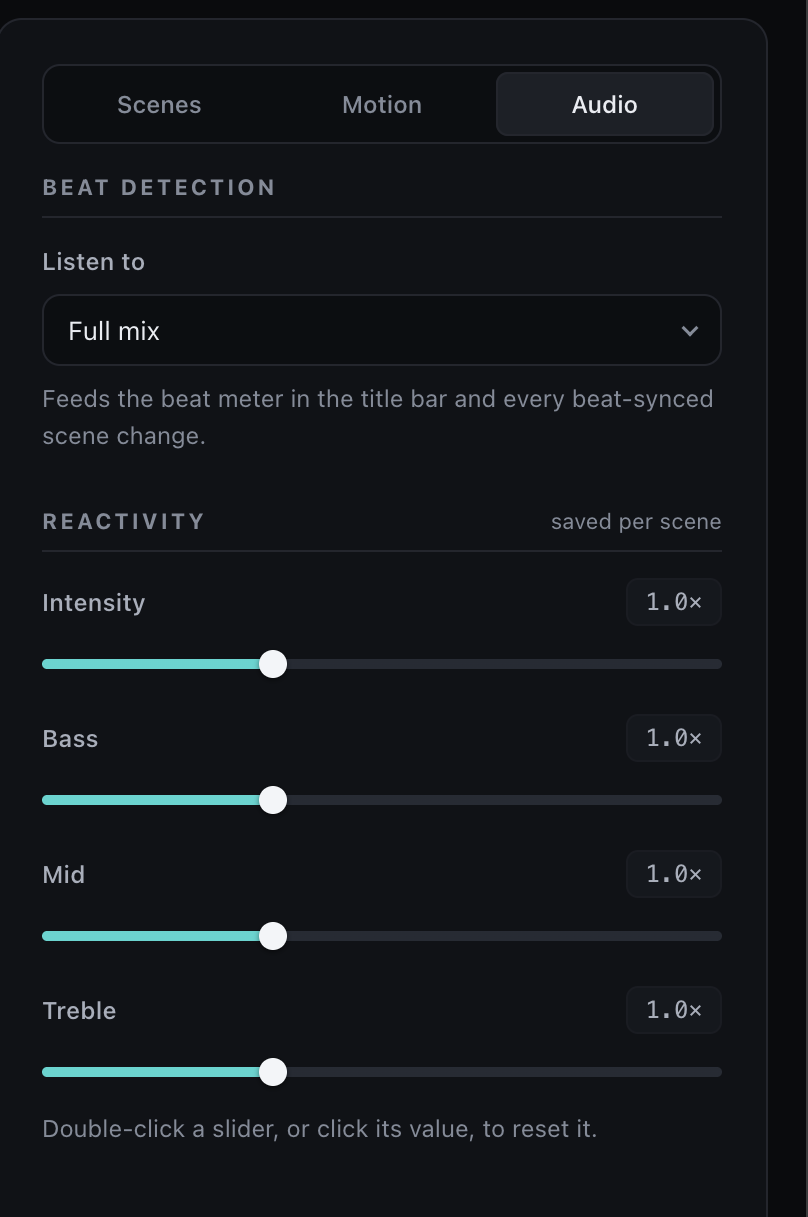
Choose what triggers a beat, then dial in intensity, bass, mids, and treble for each scene.
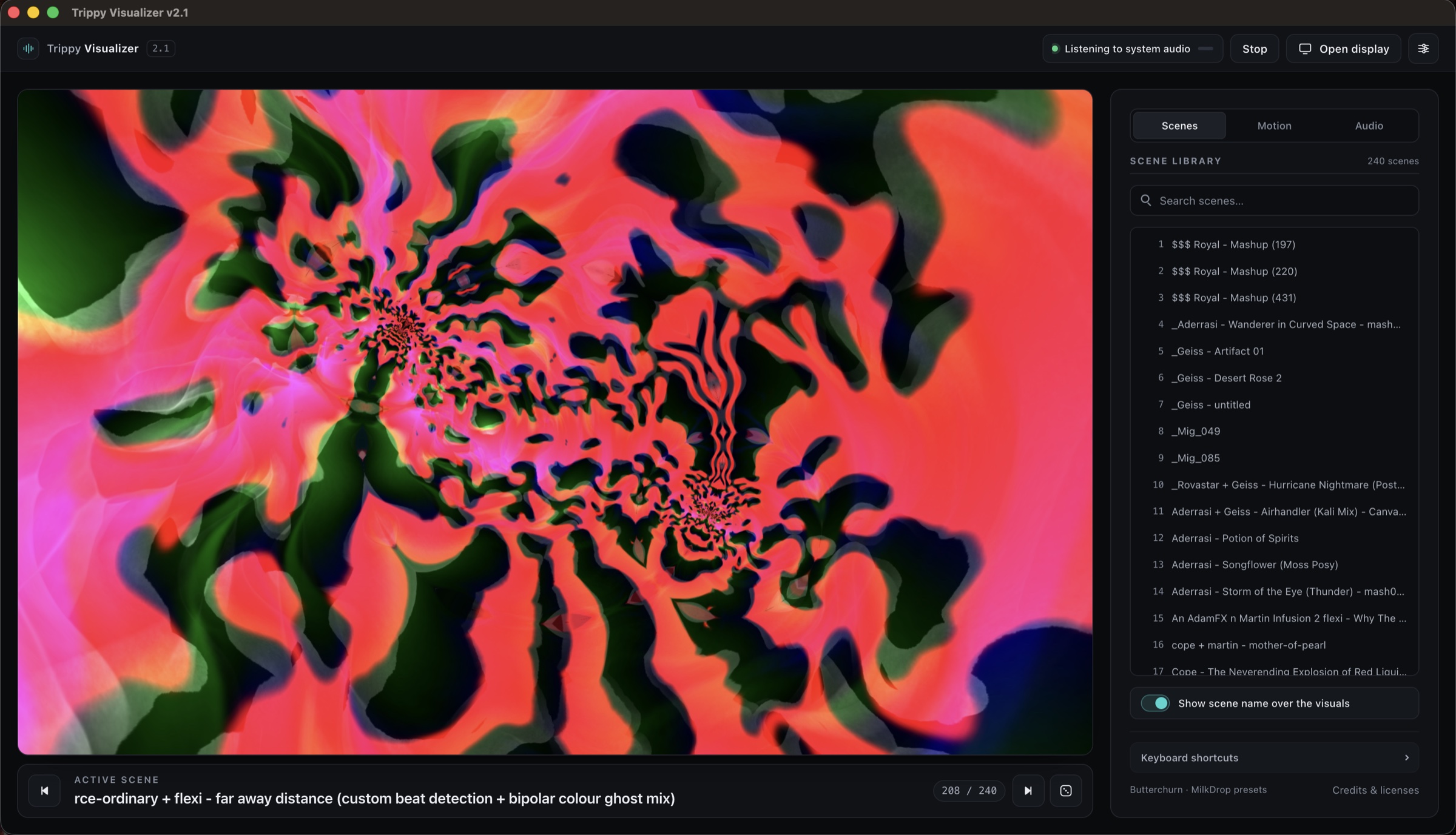
Trippy Visualizer v2.1 is the biggest update so far. Build 2.1.2 brings a rebuilt interface, sharper audio response, smoother window switching, and better stability during long sessions.
The entire control interface has been rebuilt around a larger visual stage. Controls are organized into Scenes, Motion, and Audio, making them easier to find without covering the visualizer. The active scene, scene position, capture status, and display controls are clearer at a glance.
The searchable library of 240 scenes fits naturally into the new layout, and the current scene can be shown directly over the visuals. Clicked controls now release focus naturally so they do not interfere with scene shortcuts.
Pressing H now hides everything but the visuals. The top bar, control panel, transport controls, and scene name all disappear.
Overall intensity, bass, mid, and treble now transition smoothly without making the visuals feel delayed. Higher reactivity settings preserve more detail instead of suddenly flattening at their upper limit.
Audio response timing is now separate from visual speed, so slowing down or accelerating a scene no longer changes how quickly it reacts to music. Reactivity settings are still remembered separately for every scene.
Beat detection now adjusts itself to the music instead of relying on one fixed sensitivity level. It catches quieter kicks, changes in track volume, and fast, distinct beats more consistently. It is also less likely to mistake one long, loud sound for several beats.
Detection recalibrates whenever capture restarts, the selected source changes, or the signal is interrupted. Bass, mids and highs, or the full mix can trigger scene changes in time with the beat more reliably across different songs and volume levels.
The current frame is held briefly and blended into the destination window, hiding the abrupt restart that used to happen when moving visuals between windows.
The selected scene stays put while timer progress and changes triggered by the beat continue from the correct point. If the Display Window freezes, crashes, fails to load, or closes during startup, the main control window now recovers automatically.
Full screen layouts now fill the available space properly. Opening Motion or Audio controls no longer cuts off the visualizer or leaves a large unused black area. Changing control sections also leaves the visual space the same size.
Rendering scale updates correctly when moving between standard and high resolution displays, keeping the visuals crisp without wasting GPU power.
Rapid scene changes now cancel older transition effects cleanly, preventing outdated crossfades, images, or overlays from returning after a newer scene has started.
Flash and Strobe remain available, but they are disabled by default, require confirmation during each session, and stay out of Random Mix until intentionally enabled. The app also respects the system Reduced Motion preference and avoids animated or flashing transitions when it is active.
Some MilkDrop scenes may still contain rapid motion, so anyone sensitive to flashing visuals should continue to use care.
A dedicated control now shows whether the app is listening, connecting, stopped, or interrupted. Capture can be stopped immediately and restarted without closing the app. This is useful when changing speakers, headphones, devices, or playback sources.
Interrupted audio, suspended tracks, graphics resets, rendering failures, and stalled startup attempts stop safely and provide a clear way to try again. Repeated Start requests can no longer create duplicate capture sessions, and launching repeatedly keeps one main app instance open.
Heavy audio and visual resources are reused where possible instead of being rebuilt every time Start is pressed. Transition timers, temporary images, capture tracks, and visual buffers are cleaned up when they are no longer needed.
Additional safeguards cover graphics context loss, failed rendering, audio interruptions, cancelled capture requests, and unexpected Display Window behavior. Reload shortcuts that could destroy active audio and display state have also been removed.
Scene navigation now works with arrow keys, Home, End, Space, and the existing visualizer shortcuts. Focus behavior, control labels, status messages, dialogs, scene selection, and screen reader information have all been improved.
Hidden controls stay out of the keyboard path until they are visible again, and active scene information is announced more clearly.
Audio is analyzed locally. Nothing is saved, uploaded, or transmitted. Electron requires a display stream to hear system audio, so Trippy Visualizer immediately stops the video track and uses only the audio portion for the visuals.
Only trusted control and Display Window pages may request capture. Commands between them are checked, while unexpected navigation, popups, embedded pages, and unapproved window actions are blocked. Packaged files now use stronger integrity settings, and the unnecessary macOS Keychain request has been removed.
The product name is consistent across the app and installers as Trippy Visualizer v2.1; the current internal release is 2.1.2. Packaged startup issues were corrected, installer names were standardized, and both builds were tested on real computers.
Both downloads are currently unsigned tester builds, so macOS or Windows may show a security warning the first time they are opened.
The result: Cleaner controls, more natural reactions, smoother use across multiple displays, and fewer restarts. The music and visuals stay front and center.
Download Trippy Visualizer. Pick something loud. See what happens.
Effective July 13, 2026. Trippy Visualizer does not collect, store, sell, or transmit personal information. The app does not use analytics, advertising trackers, cookies, user accounts, or crash reporting services.
Audio is processed locally on your device solely to generate reactive visuals. Your audio never leaves your computer and is not recorded or retained by Trippy Visualizer. On macOS, the Screen & System Audio Recording permission is used only to access system audio; the app does not record, inspect, or transmit your screen.
If you contact support by email, the information you choose to include is used only to respond to your request. Trippy Visualizer does not create a profile from support correspondence or use it for marketing.
Privacy questions can be sent to trippyvisualizerapp@gmail.com.
The visuals in Trippy Visualizer come from the open source MilkDrop ecosystem. Ryan Geiss created MilkDrop, the original music visualizer and preset format, for Winamp. The included scenes are MilkDrop presets made by the community. Their names credit creators including Geiss, Flexi, Martin, Rovastar, and many others.
Rendering is powered by Butterchurn and butterchurn-presets, created by Jordan Berg and licensed under the MIT License. Trippy Visualizer is built with Electron, also licensed under the MIT License.
Butterchurn & butterchurn-presets: MIT License

Copyright (c) 2013-2018 Jordan Berg

Permission is hereby granted, free of charge, to any person obtaining a copy
of this software and associated documentation files (the “Software”), to deal
in the Software without restriction, including without limitation the rights
to use, copy, modify, merge, publish, distribute, sublicense, and/or sell
copies of the Software, and to permit persons to whom the Software is
furnished to do so, subject to the following conditions:

The above copyright notice and this permission notice shall be included in all
copies or substantial portions of the Software.

THE SOFTWARE IS PROVIDED “AS IS”, WITHOUT WARRANTY OF ANY KIND, EXPRESS OR
IMPLIED, INCLUDING BUT NOT LIMITED TO THE WARRANTIES OF MERCHANTABILITY,
FITNESS FOR A PARTICULAR PURPOSE AND NONINFRINGEMENT. IN NO EVENT SHALL THE
AUTHORS OR COPYRIGHT HOLDERS BE LIABLE FOR ANY CLAIM, DAMAGES OR OTHER
LIABILITY, WHETHER IN AN ACTION OF CONTRACT, TORT OR OTHERWISE, ARISING FROM,
OUT OF OR IN CONNECTION WITH THE SOFTWARE OR THE USE OR OTHER DEALINGS IN THE
SOFTWARE.